
Did you know? Over three billion people worldwide use messaging apps, making them one of the most popular categories in the mobile app industry. From personal communication to business interactions, messaging applications have transformed the way people connect, share information, and collaborate in real time.
Apps like WhatsApp have become essential tools for instant communication because of their speed, convenience, and user-friendly features. Whether it's sending text messages, sharing images, making voice calls, or creating group chats, these platforms have set high standards for modern messaging experiences.
As businesses continue to invest in digital communication solutions, the demand for custom messaging applications is growing rapidly. Entrepreneurs and enterprises are looking to build texting apps like WhatsApp to offer secure communication, improve customer engagement, and tap into the expanding mobile app market.
Developing a texting app like WhatsApp requires a strategic approach that combines intuitive design, robust backend infrastructure, real-time messaging capabilities, and advanced security protocols. From understanding essential features to estimating development costs, every step plays a critical role in creating a successful messaging platform.
In this guide, we will explore everything you need to know about how to develop a texting app like WhatsApp, including must-have features, the development process, technology stack, and the overall cost involved in building a competitive messaging application.
Key Takeaways
- Messaging apps like WhatsApp dominate global communication, with billions of users relying on real-time, seamless connectivity.
- Building a texting app requires a strong combination of intuitive UI/UX, scalable backend infrastructure, and real-time messaging technologies.
- Essential features such as multimedia sharing, voice/video calling, group chats, and end-to-end encryption are critical for user engagement and trust.
- A well-planned development process, from market research to deployment, ensures a high-performing and competitive messaging application.
- Investing in a secure, feature-rich messaging app opens strong opportunities for user growth, business communication, and long-term monetization.
Why Build a Texting App Like WhatsApp?
Messaging apps have become an integral part of daily communication, enabling users to stay connected anytime and anywhere. Businesses are increasingly investing in messaging applications because they offer convenience, engagement, and monetization opportunities. Here are some reasons why building a texting app like WhatsApp is a smart business idea:
- Growing User Demand: The global demand for instant messaging applications continues to rise. Users prefer messaging apps for their simplicity, real-time connectivity, and multimedia capabilities.
- Business Communication: Messaging apps are no longer limited to personal chats. Companies use messaging platforms for customer support, team collaboration, and direct marketing.
- Revenue Opportunities: A texting app can generate revenue through premium subscriptions, in-app purchases, business APIs, advertisements, and value-added services.
- Scalability: With the right infrastructure, messaging apps can scale to millions of users while offering fast and reliable performance. Creating a texting app like WhatsApp allows businesses to leverage the increasing demand for secure and seamless communication solutions.
Must-have Features to Have in a Texting App
Building a messaging app like WhatsApp requires more than just basic messaging functionality. Users today expect a seamless, secure, and feature-rich communication experience. To compete in the modern app market, your texting app must include advanced capabilities that enhance usability, engagement, and performance. Below is a detailed breakdown of the essential features every texting app should include:
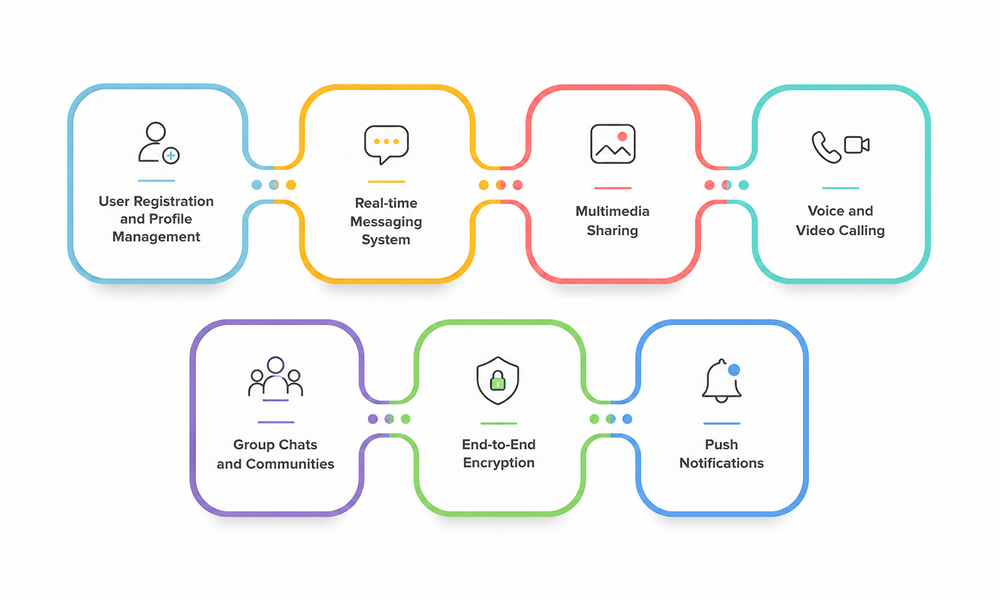
1. User Registration and Profile Management
The first interaction a user has with your app is during the onboarding process, making it one of the most critical aspects of the overall user experience. A smooth and secure registration system ensures users can quickly sign up and start using the app without friction. A robust registration system should support multiple sign-up options such as phone number verification, email registration, and social media logins. Phone number-based authentication with OTP (One-Time Password) is widely preferred because it simplifies the login process while maintaining security.
Beyond registration, profile management is equally important. Users should be able to:
- Add profile pictures
- Update display names
- Set status messages (e.g., “Available,” “Busy”)
- Customize privacy settings
Giving users control over their profiles enhances personalization and builds a stronger connection with the platform. Additionally, privacy controls such as who can see profile photos or status updates improve trust and security.
2. Real-time Messaging System
Real-time messaging is the backbone of any texting app. Users expect messages to be delivered instantly, without delays or interruptions. Achieving this requires a strong backend infrastructure that supports real-time data exchange using technologies like WebSockets or cloud-based messaging services. A high-quality messaging system should include:
- Instant message delivery and synchronization
- Offline message storage (messages are delivered when the user reconnects)
- Message timestamps for clarity
- Smooth scrolling and chat history loading
To ensure reliability, the system must handle high volumes of messages without performance issues. Scalability is key here, especially if your app is expected to grow rapidly. A well-implemented real-time messaging system significantly improves user satisfaction and retention.
3. Multimedia Sharing
Modern communication goes far beyond plain text. Users expect the ability to share various types of media quickly and easily. Multimedia sharing enhances conversations and makes the app more interactive and engaging. Your texting app should support:
- Image sharing with compression for faster uploads
- Video sharing with preview and playback options
- Document sharing (PDFs, Word files, etc.)
- Voice notes for quick audio communication
- GIFs, stickers, and emojis for expressive messaging
It’s also important to ensure that media files are securely stored and transmitted efficiently. Features like auto-download settings, media previews, and file size optimization improve the overall user experience.
4. Voice and Video Calling
Adding voice and video calling capabilities transforms your app from a simple messaging platform into a complete communication solution. This feature is essential for both personal users and businesses. The voice and video calling should include:
- High-quality audio and video streaming
- Low latency for real-time interaction
- One-on-one and group calling options
- Call logs and history tracking
Advanced features such as screen sharing, call recording, and background noise reduction can further enhance the experience. Implementing these features requires integrating VoIP technologies and ensuring strong network optimization for different internet conditions.
Also Read: A Step-by-Step Guide to Chat App Development
5. Group Chats and Communities
Group chats are a fundamental feature that allows multiple users to communicate within a single conversation. This is especially useful for families, friends, teams, and organizations. A well-designed group chat system should offer:
- Easy group creation and invitation options
- Admin roles with permission controls
- Ability to add or remove members
- Group-specific settings (name, icon, description)
For larger audiences, community or broadcast features can be added, allowing admins to send messages to a large number of users without creating cluttered conversations. This feature encourages collaboration and increases user engagement within the app.
6. End-to-End Encryption
Security is one of the most critical aspects of any messaging app. Users need to trust that their conversations are private and protected from unauthorized access.
End-to-end encryption ensures that only the sender and receiver can read the messages. Even the app provider cannot access the content. This feature should be applied to:
- Text messages
- Media files
- Voice and video calls
Implementing strong encryption protocols not only protects user data but also helps your app comply with global data privacy regulations. It significantly boosts credibility and user trust.
7. Push Notifications
Push notifications play a vital role in keeping users engaged and informed. Without notifications, users may miss important messages or updates. An effective notification system should:
- Alert users instantly about new messages
- Notify about missed calls
- Provide updates on group activity
- Include customizable notification settings
Users should also have control over notification preferences, such as muting specific chats or disabling notifications during certain hours. Smart notifications improve user experience without becoming intrusive.
Step-by-Step Process to Develop a Texting App Like WhatsApp
Developing a texting app like WhatsApp is a structured process that involves careful planning, design, development, and continuous improvement. Each stage plays a crucial role in ensuring your app is scalable, secure, and user-friendly. Below is a complete breakdown of each step with detailed explanations:
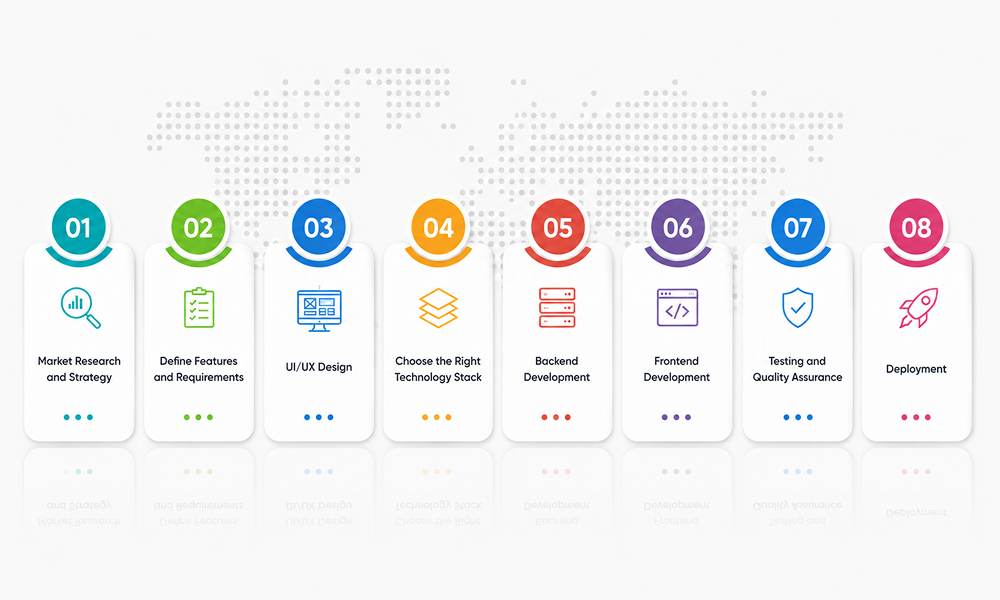
1. Market Research and Strategy
Before writing a single line of code, it’s essential to understand the market you’re entering. Market research helps you identify opportunities, reduce risks, and build a product that users actually need. This stage involves analyzing existing messaging apps, understanding their strengths and weaknesses, and identifying gaps that your app can fill. You should also define your target audience - whether it's individuals, businesses, or niche communities.
Additionally, you need to establish a clear business strategy. This includes deciding how your app will stand out, what features it will prioritize, and how it will generate revenue. A strong strategy ensures your development process stays focused and aligned with your goals.
2. Define Features and Requirements
Once you have a clear understanding of the market, the next step is to define your app’s features and technical requirements. This step acts as the blueprint for your entire project.
Start by listing all the essential features such as messaging, media sharing, calling, and notifications. Then, categorize them into:
- Core features (must-have for launch)
- Advanced features (can be added later)
You should also define technical requirements like:
- Platform (Android, iOS, or both)
- Scalability expectations
- Security standards
- Integration needs
Having well-defined requirements prevents confusion during development and ensures that your team works efficiently.
3. UI/UX Design
User Interface (UI) and User Experience (UX) design are critical for the success of your app. Even the most powerful app can fail if it’s difficult to use. In this stage, designers create:
- Wireframes (basic layout of the app)
- Prototypes (interactive models)
- Final visual designs
The goal is to make the app simple, intuitive, and visually appealing. Navigation should be smooth, and users should be able to perform actions like sending messages or making calls effortlessly.
Good UX design focuses on minimizing user effort and maximizing satisfaction. Features like easy chat access, clear icons, and responsive design play a big role in user retention.
4. Choose the Right Technology Stack
The technology stack is the foundation of your app’s performance, scalability, and reliability. Choosing the right tools and frameworks is crucial for long-term success.
Frontend Technologies
- These handle what users see and interact with. Popular choices include:
- Cross-platform frameworks for faster development
- Native technologies for better performance
Backend Technologies
The backend manages data, servers, and communication between users. It must be capable of handling real-time messaging and large user volumes.
Database
A reliable database ensures that messages, user data, and media are stored securely and can be retrieved quickly.
Choosing the right technology stack ensures your app can handle growth and deliver a smooth experience even with heavy usage.
5. Backend Development
Backend development is one of the most complex and important parts of building a messaging app. It powers all core functionalities and ensures everything works seamlessly behind the scenes. The key backend components include:
- User authentication systems
- Message routing and delivery
- Data storage and retrieval
- Media handling
- Notification services
The backend must be designed for high performance and scalability, as messaging apps often deal with millions of messages being sent simultaneously. A well-built backend ensures reliability and fast communication.
6. Frontend Development
Frontend development focuses on building the part of the app that users interact with. It transforms the UI/UX designs into a functional application. This includes:
- Chat interface development
- Contact lists
- Media sharing screens
- Call interfaces
The frontend must be responsive and optimized for different devices and screen sizes. It should also handle real-time updates smoothly, ensuring messages appear instantly without requiring manual refresh. A clean and efficient frontend significantly enhances user satisfaction.
7. Testing and Quality Assurance
Before launching your app, it must go through rigorous testing to ensure it works flawlessly. Testing includes:
- Functional testing (checking features)
- Performance testing (handling high traffic)
- Security testing (identifying vulnerabilities)
- Usability testing (ensuring ease of use)
Quality assurance teams identify bugs, fix errors, and optimize performance. This step is crucial to delivering a smooth and reliable user experience. Skipping proper testing can lead to poor reviews and user dissatisfaction.
8. Deployment
Once the app is fully developed and tested, it is ready for deployment. This involves launching the app on platforms like:
- Google Play Store
- Apple App Store
- Before release, you need to:
- Prepare app descriptions and screenshots
- Ensure compliance with platform guidelines
- Set up servers for live usage
Deployment is not just about launching the app - it’s about making it accessible, stable, and ready for real users.
How Much Does it Cost to Develop a Texting App?
Developing a texting app like WhatsApp involves multiple components, and the cost varies depending on the complexity, features, development team, and technology stack. A basic messaging app with minimal features will cost less, while a fully functional app with video calls, encryption, AI features, and cloud infrastructure requires a higher investment.
Development Stage | Estimated Cost |
|---|---|
UI/UX Design | $5,000 – $12,000 |
Frontend Development | $12,000 – $25,000 |
Backend Development | $20,000 – $40,000 |
API Integration | $8,000 – $15,000 |
Security Implementation | $8,000 – $15,000 |
Testing & QA | $6,000 – $10,000 |
Deployment | $3,000 – $6,000 |
Maintenance (Annual) | $8,000 – $15,000 |
Conclusion
Developing a texting app like WhatsApp is a complex but highly rewarding venture. With billions of users relying on messaging apps daily, the opportunity to create a successful platform is enormous. However, success requires more than just building an app. It involves strategic planning, advanced technology, strong security, and a user-first approach. By integrating essential features like real-time messaging, multimedia sharing, and encryption - along with advanced functionalities - you can create a competitive and scalable product.
At OZVID Technologies, we specialize in building robust, secure, and scalable messaging applications tailored to your business needs. Our expert team ensures seamless performance, modern UI/UX, and advanced features that help your app stand out in a crowded market. If you are ready to turn your idea into a powerful messaging platform, OZVID Technologies is your trusted development partner. Contact us today.
Frequently Asked Questions
1. How long does it take to develop a texting app like WhatsApp?
The development timeline varies based on complexity and features.
- Basic app: 3–4 months
- Medium complexity: 5–7 months
- Advanced app: 8–12 months
- Testing and updates add extra time
2. What technologies are used to build messaging apps?
Modern messaging apps rely on scalable and flexible technologies.
- Frontend frameworks like Flutter or React Native
- Backend technologies like Node.js or Python
- Databases like Firebase or MongoDB
- WebRTC for real-time communication
3. Why is security important in messaging apps?
Security ensures user trust and data protection.
- Prevents data breaches
- Protects personal information
- Secures messages and calls
- Ensures compliance with regulations
4. What are the best monetization strategies for messaging apps?
A strong monetization model helps generate revenue without affecting user experience.
- Subscription-based premium features
- In-app advertisements and promotions
- Business APIs for enterprise communication
- Paid stickers, themes, and add-ons
5. How can AI be integrated into messaging apps?
AI enhances user experience and adds intelligent features to messaging platforms.
- Chatbots automate customer interactions
- AI filters detect spam and harmful content
- Smart replies improve user convenience
- Predictive analytics enhance engagement